Ga naar de content

Document Control: The backbone of reliable project controls

In projects where dozens to thousands of documents circulate, from technical drawings to progress reports and contract changes, having an overview is not a luxury, but a necessity. Document control is the foundation on which reliable information management is built. Without a proper structure for document handling, errors, delays, and risks of claims or rework will arise.

At BAEKENMore about BAEKEN, klik hier., we do not see document control as a mere administrative requirement, but as an indispensable link in professional project controls. It supports clear communication, traceable decision-making, and structured collaboration, precisely the elements essential for success in complex projects.

One version of the truth

Projects generate large volumes of information: plans, plannings, drawings, analyses, contracts, memos, and reports. Without structure, this information disappears into folders, inboxes, and SharePoint-like environments where no one has a clear overview anymore.

A well-designed document control system ensures that:

  • it is always clear which version of a document is valid,
  • the origin of information is transparent (who changed what, and when),
  • documents are uniformly classified and remain easy to find.

It is essential to implement clear workflows for document management. We distinguish between official project documents (with legal or contractual value) and working documents, to prevent confusion about which materials are authoritative. Our approach brings calm, structure, and clarity, crucial in projects with many stakeholders and high documentation demands.

Document control as risk

In many projects, claims, delays, or escalations arise because it’s unclear what was agreed upon or approved, and when. A missing signature, the wrong version in circulation, or an incomplete decision memo, small errors with major consequences.

Document control mitigates these risks by:

  • recording approval processes,
  • managing and automatically archiving versions,
  • linking decisions to clear document statuses (draft, review, approved, final).

This is especially vital in contractual environments (UAV-GC, FIDIC, DBFM). It is crucial to always be able to fall back on accurate, complete, and accessible project records, contributing to legally strong positions and smoother collaboration.

Information as a steering instrument: document control within project controls

Document control does not stand alone, but feeds into all other aspects of project controls: scheduling, progress, risk, and finance. Think of:

  • making the right drawings available before execution,
  • tracking decision documents for scope changes,
  • logging meeting minutes as a formal basis for agreements.

At BAEKEN, we integrate document control with scheduling and management systems. This way, we can automatically link information to project phases, deadlines, and checks. Document control then becomes more than storage: it becomes an active source of insight and control.

Conclusion: reliable information, reliable projects

Without clear and reliable documentation, the rest of project controls stands on shaky ground. At BAEKEN, we make document control an integral part of project controls, not a bottleneck, but an accelerator.

Our approach ensures:

  • clarity and overview in complex document flows,
  • minimization of errors and risks,
  • and maximum reliability in collaboration and decision-making.

Document control may not be the most visible part of a project, but it is the most decisive when it comes to control, grip, quality, and trust.

Microsoft Project in Project Controls: Accessible planning tool with clear boundaries

Microsoft Project, often abbreviated to MS Project, is a widely used tool for project management and project control. It provides functions for planning, progress recording and resource management and is used in many organisations as a basis for project control.

At BAEKEN, we value MS Project as a user-friendly, accessible tool that can be used well in the early stages of projects or in smaller environments. However, we also recognise its limitations, especially in collaboration, cost management, and managing resources across multiple projects. In this article, we explore the strengths and weaknesses of MS Project within the field of project controls, while considering how it can help shape your project’s future success.

Realistic planning on an individual project basis

MS Project excels at planning individual projects. Using Gantt charts, task structures, dependencies and milestones, project schedules can be built quickly and clearly. It is possible to:

  • Create a Work Breakdown Structure (WBS) with logical task groups;
  • Define dependencies (FS, SS, FF)[moreInfo_open]finish-start (FS), start-start (SS), en finish-finish (FF)[moreInfo_close];
  • Make critical paths and milestones visible.

These features make MS Project ideal for classic planning issues in linear or less complex projects. At BAEKEN, we sometimes use the tool in the start-up phase or as an analysis tool to quickly test scenarios. Its visual representation and low entry threshold make it a pleasant tool for communicating planning to stakeholders.

Resource management: useful, but limited to a single project

MS Project makes it possible to allocate resources to tasks and visualise the workload over time. This provides insight into the feasibility of planning with available capacity.

However, MS Project has clear limitations here:

  • Resource management is by default limited to a single project file. Cross-project resource levelling requires additional tools or complicated workarounds.
  • It is difficult to centrally manage shared resource pools without complex configuration or integration.

For organisations with multiple concurrent projects, this is a major drawback. At BAEKEN, we recommend MS Project for resource management only within relatively simple projects. For more complex environments, we switch to more advanced planning solutions that foster greater collaboration and flexibility.

Cost management: possible, but not robust

MS Project provides basic cost management functionalities, such as assigning rates to resources and tracking planned versus actual costs. Combined with progress input, SPI, CPI[moreInfo_open]Schedule Performance Index (SPI) and Cost Performance Index (CPI)[moreInfo_close] and Earned Value insights can be generated.

Yet the limitations here are significant:

  • Cost visibility is often fragmented and not scalable across multiple projects.
  • There is no central cost structure or linkage to ERP systems.[moreInfo_open]Enterprise Resource Planning (ERP)[moreInfo_close]
  • Reports require manual construction or export to Excel.

For full-fledged project control on costs, as required in EPC contracts or infrastructure projects, MS Project falls short. At BAEKEN, we use it occasionally for cost analysis, but for deeper integration and reliability, we rely on tools like Primavera or dedicated EVM software.Want to know more about Earned Value Management? Read this article

Collaboration: no multi-user environment

A major drawback of MS Project is that it does not offer a true multi-user environment. Only one user can work in a project file at a time, unless complex workarounds are set up via SharePoint or Project Online. This limits:

  • Collaboration between planning, control and execution teams;
  • Real-time updates and progress recording by multiple users;
  • Integration with wider project management systems.

At BAEKEN, we consider collaboration and transparency essential within project management. Therefore, we recommend MS Project in environments where collaboration is small and manageable, and where central planning doesn’t require team involvement.

MS Project as a stepping stone to mature project controls

MS Project is especially suitable as an entry-level tool for organisations looking to professionalise their project planning. It is user-friendly, visually strong and connects well with other Microsoft tools (such as Excel and Teams).

At the same time: what starts simple often grows out of it.

When multiple projects, teams, resources, or budgets come together, MS Project hits its limits. That’s when it’s time to invest in more robust systems that drive integration, collaboration, and deeper project control.

Conclusion: useful, but with limits

Microsoft Project provides solid basic functionality for planning, resource and progress management within single projects. At BAEKEN, we use it pragmatically: as a quick and accessible tool for project structuring and communication.

However:

  • Resource management across multiple projects is limited;
  • Cost monitoring is not deep enough;
  • Collaboration is difficult without external workarounds.

This is why we see MS Project as a starting point, not the end. In a mature project controls environment, it becomes the stepping stone to better integration, broader collaboration, and deeper control.

Our maxim: use MS Project when it fits but dare to grow as soon as it pinches.

Deterministic vs. probabilistic scheduling: The importance of insight and focus

In project management, scheduling is essential to monitor progress and successfully complete projects. The difference between deterministic and probabilistic planning can make the difference between a project that stays on track and a project that faces unexpected delays. At BAEKEN, we use both methodologies to not only manage realistic expectations, but also to increase the focus within the project team, so that the team can get to work in a targeted and decisive manner.

What is deterministic scheduling?

Deterministic scheduling is the foundation of every project. It proposes a clear, fixed timeline for activities, based on assumptions that are, in principle, fixed. This type of schedule is especially useful in situations with little uncertainty. Although deterministic scheduling is necessary to structure the project, it offers little room to anticipate changes and uncertainties that may occur during the project.

What is probabilistic scheduling?

Probabilistic scheduling takes into account the uncertainties and variables that often play a role in complex projects. Instead of proposing just one fixed outcome, probabilistic scheduling calculates different scenarios based on risk and probability calculations. This enables project teams to anticipate potential problems and consider multiple outcomes.

At BAEKEN, we link these schedules to the risk dossier, so that we can identify the risks that actually affect the schedule. This helps us to focus the scheduling and prioritize which risks and parts of the project pose the greatest risk of falling behind. This focused approach allows the project team to work more efficiently and mitigate risks in a more targeted manner, often leading to significant cost savings.

Probabilistic scheduling is also important for managing stakeholder expectations. This allows a delivery milestone to be set with a certain degree of certainty, and a necessary time buffer is substantiated with the Monte Carlo analysis.

The importance of both types of scheduling

Although probabilistic scheduling offers a lot of value, deterministic scheduling remains essential. It forms the basis for deadlines and progress monitoring. Probabilistic scheduling functions as a supplement that offers insight into the uncertainties, so that we can focus on the most critical aspects of the planning. By combining both methodologies, we help our clients achieve both stability and flexibility.

Understanding risks and focusing on critical points

By using probabilistic scheduling in combination with a meticulous risk analysis, we can focus on the risks that pose the greatest danger of delay. This enables project teams to set priorities and concentrate on the areas of the project where the greatest risks lie. This allows the team to take decisive and effective action and to deploy resources efficiently to prevent delays and cost overruns.

Conclusion: Focus and efficiency with probabilistic scheduling

At BAEKEN, we use probabilistic scheduling not only to propose possible outcomes, but also to focus the project approach. By actively managing uncertainties and setting priorities, projects can be managed in a targeted way, risks can be limited and the chance of successful delivery is considerably increased.

Real-time insight into project data with dashboards

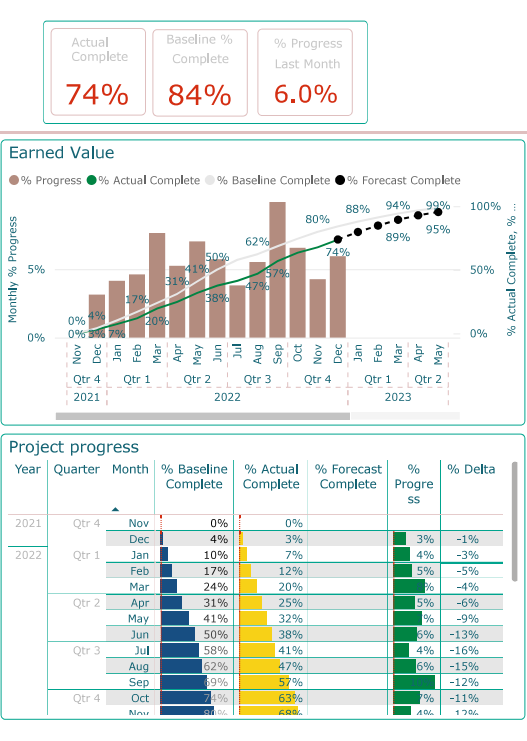
In complex projects, it is essential that stakeholders have quick and easy access to the most up-to-date information. A dashboard helps to visualize project data from different systems such as planning data, production data, risk analyses, time-recording systems, and safety systems. Dashboards differ from traditional reports in that the latter are often static and compiled manually, while a dashboard offers dynamic, real-time insights that can be adapted to the specific needs of the user.

Project teams often receive information in a fragmented way, via e-mails, PDFs and different systems. As a result, it is difficult to maintain a comprehensive overview. This is where a dashboard comes in, bringing all relevant data together in one place. Project teams can then easily access the most important information, which not only creates an effective overview, but also speeds up decision-making and improves collaboration.

Unlike thick reports with static graphs, a dashboard offers flexibility. Users can apply filters to see only the data relevant to them. This makes the information directly applicable and transparent, which is crucial for making quick, data-driven decisions. Whether it concerns the status of Key Performance Indicators (KPIs) or trends in risk management, a dashboard always provides an up-to-date picture of the project’s status.

Creating a dynamic dashboard

During the development of dashboards, our first question to the client is usually: “What do you want to know?” Oftentimes the answer is simple, for example: “Is the project going well?” This is often visualized as a traffic light. However, we know from experience that project performance is much more complex. We help clients by applying best practices, so that the dashboard not only shows whether a project is going “well”, but also provides insight into underlying trends and risks.

Another important aspect is the quality of the data. Data quality issues often come to light during the setup of dashboards. By providing insight into these issues, we can work with the client to improve processes. In this way, a dashboard not only provides better insight, but also optimizes the underlying systems.

The advantages of dashboards in Project Controls

  • Real-time updates: Dashboards provide the most up-to-date information on the progress of projects, which is essential for making quick adjustments.
  • Interactivity: Users can easily apply filters to see only the data relevant to them, without having to rely on pre-compiled reports.
  • Insight into KPIs: With a dashboard, you can monitor the development of KPIs on a daily basis, which helps in making strategic decisions and improving project performance.
  • Improving data quality: By using dashboards, problems in the data become visible, which often leads to better processes and more accurate insights.
  • Centralizing information: By bringing together information from different sources, a dashboard provides a clear overview, so that project teams have faster and better access to crucial information.

Power BI: Our preferred choice

At BAEKEN, we predominantly use Microsoft Power BI because of its extensive visualization options and user-friendliness. Power BI allows us to integrate information from different systems and offers extensive options for creating dynamic and interactive dashboards.

What should you consider when switching to OPC?

Introduction

Switching to a new project management platform raises many questions. Oracle Primavera Cloud (OPC)Optimize Your Project Management with Oracle Primavera Cloud: When and Why OPC is the Right Choice – BAEKEN is the cloud-based successor to the well-known Primavera P6 planning tool. More and more organizations that work with Primavera P6 are considering the switch to OPC because of the clear advantages in terms of costs, accessibility and collaboration. But what do you need to think about when you take this step? In this knowledge article, we discuss the most important points to consider for a smooth transition. We will discuss the benefits of OPC, essential OPC modules to get started with, how quickly teams can get started with OPC, how to get the team on board, and transferring current projects to the new environment.

Benefits of OPC

Choosing Oracle Primavera Cloud offers various advantages over traditional on-premise solutions such as Primavera P6. Some important advantages at a glance:

  • Cost savings: OPC uses a flexible subscription model. You save on high one-time license fees and the costs of your own servers and maintenance. Updates and support are included, which prevents unexpected expenses.
  • Accessibility: Because OPC is completely cloud-based, you can access your project data anytime, anywhere. A web browser (or even a mobile app) is all you need – employees in the office, at home or on the construction site have 24/7 access to the planning.
  • Collaboration: Real-time collaboration becomes a lot easier. In OPC, multiple team members can work on projects simultaneously and see updates immediately. This increases transparency and makes communication within project teams and with stakeholders more efficient.
  • Integration with other systems: Oracle Primavera Cloud can be easily linked to other business systems. This includes integration with ERP packages, financial systems or BI tools. Thanks to modern APIs and standard interfaces, data between OPC and other software flows together seamlessly, allowing you to make data-driven decisions without having to manually transfer data. From OPC Dashboarding to in-depth insights with Power BI and API integration – BAEKEN

Which OPC modules are essential to start with?

Oracle Primavera Cloud is an extensive suite with various modules (such as planning, risk management, resource & cost management, portfolio management and Lean planning). To get off to a solid start, it is wise to focus on the basics: planning and project management.

In practice, this means starting with the Scheduling module for drawing up project plans, monitoring progress and managing projects. These components cover the core functionality you are familiar with from Primavera P6: planning activities, allocating resources and monitoring milestones and deadlines. By first mastering this essential module, you will lay a solid foundation. Later you can gradually expand with additional modules, such as the RiskOPC Risk: BAEKEN APPROVED – BAEKEN, TaskFrom Kanban board to OPC Task: For efficient and insightful lean planning – BAEKEN or Costs and Funds moduleEffective cost management with OPC Cost and Funds – BAEKEN, as soon as the team is ready. This way, the transition remains clear and you avoid users becoming overwhelmed by too many new features at once.

How quickly can teams get started with OPC?

A frequently asked question when switching to new software is how steep the learning curve is and how quickly teams can be productive. Fortunately, OPC has been designed with a modern, user-friendly interface. Many users find the system more intuitive than the old Primavera P6. This means that the training time required can be shorter. With targeted training and guidance, planners, cost controllers, risk managers or other members of the project management team can often master the basics within a few days.

Because OPC is cloud-based, you also don’t have to spend time on technical installations at each workstation. As soon as the environment has been set up and the user accounts have been created, the team can start entering projects and data almost immediately. In practice, you see small project teams switching completely to OPC within a few weeks. Larger organizations take a little more time for a phased implementation – think one to three months – so that everyone becomes familiar with the system and any adjustments to processes can be implemented gradually. It is important to offer sufficient support and opportunities for practice during that period, so that the team builds confidence in the new way of working.

How do you get the team on board?

Introducing a new tool is not only a technical change, but also a human one. Creating support among all users is crucial for success. Some tips to get your team excited and involved in the transition:

  • Communicate the benefits – clearly explain why you are switching to OPC. Emphasize how everyone will benefit, for example, less double administration, always up-to-date schedules and easier collaboration. If people recognize the added value, they will be more willing to change.
  • Involve key users at an early stage – Identify a few enthusiastic planners or project leaders who can act as OPC ambassadors. Involve them in the implementation and training at an early stage. They can later help and positively influence their colleagues.
  • Provide training and support – Invest in good (customized) training for all users, tailored to their role. Not everyone needs the same information: a planner wants to know all the details, while a manager mainly uses dashboards and reports. Also offer support after the training (for example, a point of contact or online manual) so that users feel supported.
  • Celebrate quick wins – As soon as the team reaches the first milestones in OPC, celebrate! Share success stories, for example how a project update now goes much faster or how two departments are working better together thanks to the new tool. This kind of positive feedback encourages other colleagues to start using OPC to the fullest.

By paying attention to change management and the various interests of users, you can ensure a smooth transition. Ultimately, employees want to know how OPC helps them in their daily work – show them that, and you will find that adoption goes a lot more smoothly.

Is it difficult to transfer ongoing projects?

What if you are halfway through a project and decide to switch to OPC? Fortunately, transferring ongoing projects does not have to be too difficult, provided you prepare well. A few points to consider:

Data migration – Oracle Primavera Cloud offers options for importing existing Primavera P6 projects (for example via .xer export files). This means you do not have to start from scratch with current projects. It is important to thoroughly check the data after the import. Consider the planning, resources, relationships between tasks and any baseline or progress information. An analytical eye is useful here: is all the data correct and do the reports in OPC match what you were used to? By trying out test projects, you can build confidence that the migration will go smoothly before you transfer critical projects.

Integration – Had you linked Primavera P6 to other systems (such as an ERP system for budgets or a time-logging system)? Then you will have to redesign these integrations for OPC. The good news is that OPC has modern links (APIs), which generally makes technical integration easier than with the old environment. Plan enough time to test and refine all the links so that all the systems continue to work together without any loss of data or delays.

Challenges and points for attention – Keep in mind that OPC is not one-to-one identical to P6. Certain functions work slightly differently or have been improved in OPC. It may take some time for the team to familiarize itself with the new method in ongoing projects. Therefore, consider whether it makes sense to switch in the middle of a critical project, or whether it is better to wait until a project phase has been completed. An alternative is to set up the current project in parallel in OPC (shadow project) and to keep track of both for a while, so that the team can get used to it before switching completely. With a progressive but well-considered approach, you can manage the transition of existing projects without too many hitches.

How BAEKEN can help you make the switch

A successful transition to OPC requires not only new tools, but also a new mindset. BAEKEN supports you during this process by training your team, optimizing workflows and seamlessly integrating OPC into your organization. With a data-driven and innovative approach, we ensure that your projects are managed more efficiently and effectively. Curious about how we can help you utilize OPC to its fullest potential? Contact us and discover the possibilities.

Probabilistic (Monte Carlo analysis) Planning with Oracle Primavera Risk Analysis (OPRA)

In a world full of complexity and uncertainty, risk management is crucial to the success of large projects. Whether it concerns high-tech innovations, energy transition, area development or infrastructure, projects often involve significant risks and unexpected events that can disrupt progress. At BAEKEN, we use Oracle Primavera Risk Analysis (OPRA) to provide project teams with the insights they need to remain successful. In this article, we discuss the unique capabilities of OPRA and why it is still one of the best choices for Monte Carlo analysis in large-scale projects.

Wat is Oracle Primavera Risk Analysis (OPRA)?

OPRA is an advanced software tool that has been specially designed for modeling and analyzing risks within complex project plans. With OPRA, project teams can identify and analyze risks and predict the impact on project costs and timelines by using probabilistic methods such as Monte Carlo analyses. Although the tool’s interface is outdated and the software has a steep learning curve, OPRA offers unparalleled depth and accuracy in risk assessment. This makes it an essential tool for companies that want to actively manage risks and make strategic decisions based on detailed data.

When to use OPRA?

OPRA is the ideal choice for sectors where risks have a major impact on project progress and budgets. At BAEKEN, we use OPRA primarily when a detailed risk register is available and there is a need to accurately quantify and manage uncertainties. The tool helps us develop probabilistic schedules that take uncertainties and risks into account, enabling project managers to better anticipate potential problems and create realistic expectations.

Benefits of OPRA

  1. Thorough risk analysis and impact assessment OPRA offers extensive possibilities for systematically analyzing risks and assessing their potential impact on projects. This gives project managers the opportunity to make informed decisions and proactively implement risk-mitigating measures. The tool provides insight into which risks can influence critical paths and helps project teams set priorities when mitigating risks.
  2. Monte Carlo Analysis for Accurate Forecasting Using Monte Carlo simulations, OPRA can generate thousands of scenarios to calculate the likelihood of different outcomes. This allows project managers to get a realistic picture of the impact of risks on planning and costs. At BAEKEN, we use Monte Carlo analyses to model probabilistic scenarios, so that our clients have an accurate picture of possible project outcomes.

Monte-Carlo analysis[/caption]

  • Probabilistic Planning with a Focus on P85 Milestones and Critical Risks Probabilistic planning with OPRA makes it possible to predict different outcomes based on risk data. We often focus on P85 milestones (with an 85% chance of meeting deadlines), which are essential in contracts and progress reports. By emphasizing the most critical risks, we can more effectively manage potential delays and cost overruns.
  • Support for Probabilistic Branching and What-If Scenarios A unique feature of OPRA is probabilistic branching, in which different alternative scenarios are modeled, depending on specific events or risks. This feature enables project managers to perform what-if analyses and visualize the impact of potential changes to the planning, allowing for better substantiation of strategic choices.
  • Tornado diagram for probabilistic branching[/caption]

  • Modeling Integrated Risks and Consequences OPRA enables users to model risks that can simultaneously influence multiple project elements, such as costs, time and resources. This integrated approach allows project teams to respond more quickly and accurately to changes and risks throughout the entire project structure.
  • Integration with Existing Project Management Tools Although OPRA is powerful in its own right, it can also be seamlessly integrated with other project management tools such as Oracle Primavera P6. This ensures a uniform approach to risk management, keeping schedules and risk files up to date and synchronized.
  • Why BAEKEN and OPRA?

    At BAEKEN, we understand that risk management is more than just identifying potential hazards; it is about strategically managing these risks to reduce the chance of project failure. Our consultants are trained in the use of OPRA and support our clients in drawing up detailed risk registers and performing probabilistic analyses. We help organizations not only identify risks, but also determine which risks have the greatest impact and where proactive mitigation is necessary.

    Conclusion

    Although OPRA may not be the most user-friendly tool, it offers unparalleled possibilities for in-depth risk analysis and probabilistic planning. Thanks to its unique features such as Monte-Carlo analysis, probabilistic branching, and the possibility to model integrated risks, OPRA remains a powerful choice for organizations that strive for accurate and detailed risk management. At BAEKEN, we help clients get the most out of OPRA and successfully complete their projects through effective risk management.

    Are you ready to take your risk management to the next level? Contact BAEKEN and discover how we can strengthen your next project with Oracle Primavera Risk Analysis.

    Why EVM is the key to project control: Insight, management, and optimization

    Earned Value Management (EVM) offers a powerful way to gain insight into the performance of your project. When properly set up, EVM can yield much more than just a single S-curve. It offers dynamic, in-depth insights that help to monitor and adjust the performance of various project aspects such as disciplines, contractors and phases. At BAEKEN, we go beyond the standard approach. We always link EVM to probabilistic analyses to provide a more realistic picture of project performance. Here, we explain what EVM can do for you and what you need to successfully implement it.

    What does EVM do?

    1. In-depth insight into value production on multiple levels EVM not only gives you a general picture of your project’s progress, but also allows you – if properly set up – to break down performance by discipline, contractor or project phase. This makes it possible to manage more effectively where necessary. It enables project managers to identify problem areas in a timely manner and take action before they have a greater impact on the overall project.
    2. Proactive control of costs and time EVM makes it possible to identify deviations in costs and time at an early stage. By continuously monitoring with indicators such as the cost performance index (CPI) and the schedule performance index (SPI), project managers can intervene before a small deviation leads to major delays or cost overruns. This helps to maintain control over the project, even when it has to deal with unforeseen circumstances.
    3. Better risk management and process improvement EVM often exposes inefficiencies and weaknesses in planning and execution. When project performance lags, EVM provides insight into which processes or data flows need improvement. This not only makes it possible to better manage the current project, but also provides valuable lessons for future projects.
    4. Probabilistic analyses for realistic planning At BAEKEN, we go beyond the standard EVM approach. Instead of basing EVM solely on deterministic planning, we link it to probabilistic analyses such as Monte Carlo simulations. This means the EVM curve is not only based on a relatively unachievable plan, but on realistic, probabilistic values such as the common P85. This provides a much more accurate picture of the progress of the project and offers reliable information to steer by.

    Conclusion

    Earned Value Management offers much more than just a snapshot of your project. It gives you in-depth insights that enable you to steer dynamically, manage risks and monitor value production at specific levels. At BAEKEN, we go even further by linking EVM to probabilistic analyses, which gives a more realistic picture of project performance and enables better-informed decisions. By setting up EVM properly, you can not only improve the performance of your project, but also draw valuable lessons for your entire organization.

    Aligning Scope and Change for Effective Project Management

    Change management and scope management are two distinct but interrelated aspects of project management. Understanding the difference between them is essential for effectively managing projects.

    Scope Management

    Definition: Scope management involves defining and controlling what is and is not included in the project. It ensures that the project includes all the work required, and only the work required, to complete the project successfully.

    Key Activities:

    1. Scope Planning: Developing a detailed project scope statement that defines the project’s deliverables and boundaries.
    2. Scope Definition: Breaking down the project into smaller, manageable parts (Work Breakdown Structure – WBS).
    3. Scope Validation: Formalizing acceptance of the completed project deliverables by the stakeholders.
    4. Scope Control: Monitoring the project’s scope and managing changes to the scope baseline.

    Objectives:

    • Clearly define project deliverables and boundaries.
    • Ensure all necessary work is included.
    • Prevent scope creep by controlling changes to the project scope.
    • Maintain alignment with project goals and stakeholder expectations.

    Change Management

    Definition: Change management involves handling any alterations to the project, including changes in scope, schedule, costs, and resources. It ensures that changes are evaluated, approved, and implemented in a controlled manner.

    Key Activities:

    1. Change Identification: Recognizing the need for changes, whether they arise internally or externally.
    2. Change Evaluation: Assessing the impact of proposed changes on the project.
    3. Change Approval: Obtaining formal approval for changes from the appropriate authorities, often a Change Control Board (CCB).
    4. Change Implementation: Executing the approved changes and updating project documents, schedules, and budgets.
    5. Change Monitoring: Tracking the impact of changes and ensuring they are implemented effectively.

    Objectives:

    • Manage alterations to project scope, schedule, costs, and resources.
    • Ensure changes are evaluated thoroughly and approved appropriately.
    • Minimize disruptions and risks associated with changes.
    • Maintain project alignment with its goals and objectives despite changes.

    Conclusion

    While scope management and change management are distinct processes, they are closely interrelated. Scope management defines the boundaries of the project, and change management handles any alterations to those boundaries as well as other project aspects. Effective project management requires both clear definition and control of the project scope and a structured approach to managing changes to ensure project success. By integrating scope management and change management, project teams can maintain project integrity, adapt to new information and requirements, and achieve their objectives efficiently.

    From OPC Dashboarding to in-depth insights with Power BI and API integration

    Create an overview of your project with dashboards and improve communication to stakeholders and management. Oracle Primavera Cloud (OPC)Want to know if OPC is a suitable solution for your project? Read this article offers its own dashboard module for this purpose, which allows you to create visual representations of schedules, risks and costs. Despite this, the dashboard functionality of OPC remains limited when you really need in-depth insights.

    Examples of OPC Dashboard functionality

    At BAEKEN, we solve this by accessing the data from OPC via an API and further visualizing it in Power BI. In this way, we combine the power of OPC with the flexibility and analysis capabilities of Power BI, leading to smarter insights and better decisions.

    The limitations of OPC dashboarding

    OPC’s dashboard module provides a good foundation, such as standard charts and visualizations of project progress, trends, and tasks. OPC also makes it easy to share dashboards with colleagues and team members. Nevertheless, the system has its shortcomings:

    • Limited customizability and chart options;
    • No possibility to combine data with other data sources;
    • Less suitable for in-depth analysis and custom visualizations.

    As a result, with OPC dashboarding, you are often stuck with superficial insights. For organizations that want more, accessing OPC data via an API[moreInfo_open]An API (Application Programming Interface) is a set of rules and protocols that software programs use to communicate with each other. It acts as a bridge that allows one program to access functions or data of another program. This makes it possible, for example, to exchange information or services[moreInfo_close] is a solution.

    From OPC data to flexible dashboards with Power BI

    At BAEKEN, we use OPC ‘s API to make all available project data instantly and fully accessible. Through this link to Power BI, we bring data together and create in-depth, interactive dashboards that fit the needs of your project, program, or portfolio.

    What makes our approach unique?

    1. Customized visualizations: KPIs, risk monitoring, resource utilization, and performance indicators are presented bespoke to your organization.
    2. Integration with other data sources: Combine OPC data with financial information, HR data, and operational reports for cross-functional analysis.
    3. Insight into risks and opportunities: Interactive dashboards show in real-time which tasks, risks, or milestones need attention.
    4. Easy communication: Clear, visual dashboards increase stakeholder support and make complex analyses easy to understand.

    Looking ahead: tailored insight for the entire organization

    By integrating OPC data into Power BI, you optimize your project management in a way that matches modern expectations of data-driven decision making. API-driven dashboards not only offer more flexibility, but also provide a broader perspective on project performance, budget monitoring, and resource management. Imagine: one-click access to project performance and the ability to make proactive adjustments at the project level.

    Ready to take your Project Control to the next level?

    At BAEKEN we are experts in accessing OPC data via API and translating complex project information into clear, visual dashboards in Power BI. We make sure your data truly works for you to help you better manage time, cost, and quality.

    Contact us and discover how BAEKEN transforms your OPC dashboarding into valuable insights that let your projects, programs, and portfolios excel.

    Examples BAEKEN Power BI – OPC Dashboard


    From Kanban board to OPC Task: For efficient and insightful lean planning

    Introduction

    In lean planning, the troublesome but well-known planning method involves the physical “sticker session.” Team members gather around a board, post-its in hand, and stick on their tasks for the week. At the end of the week, the board is rearranged again because not all tasks have been completed. While this method can be effective, there are hefty drawbacks: lack of overview and no direct link to the overall project schedule.[moreInfo_open]Not to mention post-its falling off the wall because they don’t stick properly[moreInfo_close] In this article, I’ll tell you more about how Oracle Primavera Cloud (OPC) Task can provide a solution to this.

    Make the leap to digitiation

    Imagine being able to turn that chaos of paper and post-its into a smooth digital process. OPC offers the perfect solution with the Task Module. No more manually shifting post-its or miscommunicating on tasks. Everything is automatically linked to the relevant activities in the planning. This way, you keep an overview, make sure your team is always in sync and your planners experience less stress processing the lean planning.

    Why the OPC Task Module?

    1. From stickers to clever integration
      With the OPC Task Module, the well-known “sticker session” has been digitized and improved. Tasks are directly linked to planning activities, so that shifts are immediately visible to the planner and they can quickly intervene to prevent delays. In this way, there is greater insight into ongoing activities within the project at all levels.Reporting and visualization – BAEKEN   
    2. Constant real-time overview even on your phone
      No more manual shuffling on a physical board; with OPC, the team gets an up-to-date overview of all tasks and their status that they can even view on their phone through the OPC app.[externalLink_open]Oracle Primavera Cloud Mobile App[externalLink_close] This creates more insight and support within the team, since everyone can always see the current schedule of tasks. Delays are reported automatically, saving you time and solving problems faster. 
    3. Efficient collaboration and direct communication
      As with physical stickers, each team member or company gets their own colour in OPC. Tasks can be immediately ticked off when they are completed and those responsible for the next task are immediately notified via integrated handovers, so they can get straight to work on their task. This makes the entire process streamlined and clear.

    Transform your project controls with OPC and BAEKEN

    With OPC Task, you get a solution that not only meets the modern requirements of project management. It also provides a powerful tool to strengthen collaborations and make progress tangible. BAEKEN is ready to seamlessly integrate this innovative tool into your organization and support you and your team on your way to greater insight and success in planning and execution.Advice and consultancy – BAEKEN 

    Ready to take the next step?

    Contact us for a complimentary discussion on how BAEKEN can help you implement the OPC Task Module. Together we will discover the possibilities to take your project management to the next level. Step away from the physical stickers and embrace the future of lean project planning with Oracle Primavera Cloud and BAEKEN!